06. Introduction to System
In this article, we will introduce the last basic concept, System.
First, let’s take a look at the code below:
using UnityEngine;
using UnityEngine.UI;

namespace QFramework.Example
{

    // 1. 定义一个 Model 对象
    public class CounterAppModel : AbstractModel
    {
        private int mCount;

        public int Count
        {
            get => mCount;
            set
            {
                if (mCount != value)
                {
                    mCount = value;
                    PlayerPrefs.SetInt(nameof(Count),mCount);
                }
            }
        }

        protected override void OnInit()
        {
            var storage = this.GetUtility<Storage>();

            Count = storage.LoadInt(nameof(Count));

            // 可以通过 CounterApp.Interface 监听数据变更事件
            CounterApp.Interface.RegisterEvent<CountChangeEvent>(e =>
            {
                this.GetUtility<Storage>().SaveInt(nameof(Count), Count);
            });
        }
    }

    // 定义 utility 层
    public class Storage : IUtility
    {
        public void SaveInt(string key, int value)
        {
            PlayerPrefs.SetInt(key,value);
        }

        public int LoadInt(string key, int defaultValue = 0)
        {
            return PlayerPrefs.GetInt(key, defaultValue);
        }
    }


    // 2.定义一个架构(提供 MVC、分层、模块管理等)
    public class CounterApp : Architecture<CounterApp>
    {
        protected override void Init()
        {
            // 注册 Model
            this.RegisterModel(new CounterAppModel());

            // 注册存储工具的对象
            this.RegisterUtility(new Storage());
        }
    }

    // 定义数据变更事件
    public struct CountChangeEvent // ++
    {

    }

    // 引入 Command
    public class IncreaseCountCommand : AbstractCommand
    {
        protected override void OnExecute()
        {
            this.GetModel<CounterAppModel>().Count++;
            this.SendEvent<CountChangeEvent>(); // ++
        }
    }

    public class DecreaseCountCommand : AbstractCommand
    {
        protected override void OnExecute()
        {
            this.GetModel<CounterAppModel>().Count--;
            this.SendEvent<CountChangeEvent>(); // ++
        }
    }

    // Controller
     public class CounterAppController : MonoBehaviour , IController
    /* 3.实现 IController 接口 */
    {
        // View
        private Button mBtnAdd;
        private Button mBtnSub;
        private Text mCountText;

        // 4. Modelprivate CounterAppModel mModel;

        void Start()
        {
            // 5. 获取模型
            mModel = this.GetModel<CounterAppModel>();

            // View 组件获取
            mBtnAdd = transform.Find("BtnAdd").GetComponent<Button>();
            mBtnSub = transform.Find("BtnSub").GetComponent<Button>();
            mCountText = transform.Find("CountText").GetComponent<Text>();


            // 监听输入
            mBtnAdd.onClick.AddListener(() =>
            {
                // 交互逻辑
                this.SendCommand<IncreaseCountCommand>();
            });

            mBtnSub.onClick.AddListener(() =>
            {
                // 交互逻辑
                this.SendCommand(new DecreaseCountCommand(/* 这里可以传参(如果有) */));
            });

            UpdateView();

            // 表现逻辑
            this.RegisterEvent<CountChangeEvent>(e =>
            {
                UpdateView();

            }).UnRegisterWhenGameObjectDestroyed(gameObject);
        }

        void UpdateView()
        {
            mCountText.text = mModel.Count.ToString();
        }

        // 3.
        public IArchitecture GetArchitecture()
        {
            return CounterApp.Interface;
        }

        private void OnDestroy()
        {
            // 8. 将 Model 设置为空
            mModel = null;
        }
    }
}
Here, we assume a feature, that is, when the count reaches 10, trigger a “Click Master” achievement, and when clicked 20 times, trigger a “Click Expert” achievement.
The logic sounds simple, we can write it directly in the IncreaseCountCommand, as follows:
    public class IncreaseCountCommand : AbstractCommand
    {
        protected override void OnExecute()
        {
            var model = this.GetModel<CounterAppModel>();

            model.Count++;
            this.SendEvent<CountChangeEvent>(); // ++
            if (model.Count == 10)
            {
                Debug.Log("触发 点击达人 成就");
            }
            else if (model.Count == 20)
            {
                Debug.Log("触发 点击专家 成就");
            }
        }
    }
The code is simple, let’s run the test.
After running, I clicked the + button 20 times, and the result is as follows:

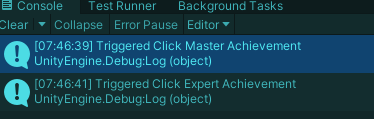
This feature was completed quickly.
But at this point, the planner said that he hopes to add another feature, that is, when clicking the - button to -10, trigger a “Click Rookie” achievement. Then the planner also said that the “Click Master” and “Click Expert” achievements are too easy to achieve, and need to be changed to 1000 times and 2000 times respectively.
And this requirement proposed by the planner requires us to modify the code in two places, that is, we need to modify the values to 1000 and 2000 in the IncreaseCountCommand, and then add a judgment logic in the DecreaseCountCommand.
A requirement proposed at once resulted in multiple modifications, which indicates that there is a problem with the code.
First of all, for this kind of rule-based logic, such as score statistics or achievement statistics, it is not suitable to be written separately in Command, but suitable to be written in a unified object, and this kind of object is provided in QFramework, which is the System object.
The usage is as follows:
using UnityEngine;
using UnityEngine.UI;

namespace QFramework.Example
{

    // 1. 定义一个 Model 对象
    public class CounterAppModel : AbstractModel
    {
        private int mCount;

        public int Count
        {
            get => mCount;
            set
            {
                if (mCount != value)
                {
                    mCount = value;
                    PlayerPrefs.SetInt(nameof(Count),mCount);
                }
            }
        }

        protected override void OnInit()
        {
            var storage = this.GetUtility<Storage>();

            Count = storage.LoadInt(nameof(Count));

            // 可以通过 CounterApp.Interface 监听数据变更事件
            CounterApp.Interface.RegisterEvent<CountChangeEvent>(e =>
            {
                this.GetUtility<Storage>().SaveInt(nameof(Count), Count);
            });
        }
    }


    public class AchievementSystem : AbstractSystem // +
    {
        protected override void OnInit()
        {
            var model = this.GetModel<CounterAppModel>();

            this.RegisterEvent<CountChangeEvent>(e =>
            {
                if (model.Count == 10)
                {
                    Debug.Log("触发 点击达人 成就");
                }
                else if (model.Count == 20)
                {
                    Debug.Log("触发 点击专家 成就");
                } else if (model.Count == -10)
                {
                    Debug.Log("触发 点击菜鸟 成就");
                }
            });
        }
    }

    // 定义 utility 层
    public class Storage : IUtility
    {
        public void SaveInt(string key, int value)
        {
            PlayerPrefs.SetInt(key,value);
        }

        public int LoadInt(string key, int defaultValue = 0)
        {
            return PlayerPrefs.GetInt(key, defaultValue);
        }
    }


    // 2.定义一个架构(提供 MVC、分层、模块管理等)
    public class CounterApp : Architecture<CounterApp>
    {
        protected override void Init()
        {
            // 注册 System
            this.RegisterSystem(new AchievementSystem()); // +

            // 注册 Model
            this.RegisterModel(new CounterAppModel());

            // 注册存储工具的对象
            this.RegisterUtility(new Storage());
        }
    }

    // 定义数据变更事件
    public struct CountChangeEvent // ++
    {

    }

    // 引入 Command
    public class IncreaseCountCommand : AbstractCommand
    {
        protected override void OnExecute()
        {
            var model = this.GetModel<CounterAppModel>();

            model.Count++;
            this.SendEvent<CountChangeEvent>(); // ++
        }
    }

    public class DecreaseCountCommand : AbstractCommand
    {
        protected override void OnExecute()
        {
            this.GetModel<CounterAppModel>().Count--;
            this.SendEvent<CountChangeEvent>(); // ++
        }
    }

    // Controller
    public class CounterAppController : MonoBehaviour , IController
    /* 3.实现 IController 接口 */
    {
        // View
        private Button mBtnAdd;
        private Button mBtnSub;
        private Text mCountText;

        // 4. Model
        private CounterAppModel mModel;

        void Start()
        {
            // 5. 获取模型
            mModel = this.GetModel<CounterAppModel>();

            // View 组件获取
            mBtnAdd = transform.Find("BtnAdd").GetComponent<Button>();
            mBtnSub = transform.Find("BtnSub").GetComponent<Button>();
            mCountText = transform.Find("CountText").GetComponent<Text>();


            // 监听输入
            mBtnAdd.onClick.AddListener(() =>
            {
                // 交互逻辑
                this.SendCommand<IncreaseCountCommand>();
            });

            mBtnSub.onClick.AddListener(() =>
            {
                // 交互逻辑
                this.SendCommand(new DecreaseCountCommand(/* 这里可以传参(如果有) */));
            });

            UpdateView();

            // 表现逻辑
            this.RegisterEvent<CountChangeEvent>(e =>
            {
                UpdateView();

            }).UnRegisterWhenGameObjectDestroyed(gameObject);
        }

        void UpdateView()
        {
            mCountText.text = mModel.Count.ToString();
        }

        // 3.
        public IArchitecture GetArchitecture()
        {
            return CounterApp.Interface;
        }

        private void OnDestroy()
        {
            // 8. 将 Model 设置为空
            mModel = null;
        }
    }
}
The code is getting longer, but it’s not difficult.
After running the game, the result of my click is as follows:
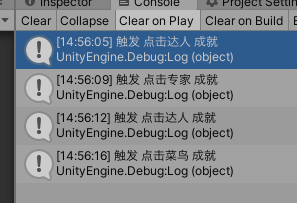

The result is correct.
Well, the achievement system I wrote is very rudimentary. In fact, the achievement system can be written very well, such as storage and loading operations in the achievement system. The achievement system in this article is only for display purposes.
So far, we have touched on the core concepts provided by the QFramework architecture.
Let’s review the two pictures in the first article, as follows:
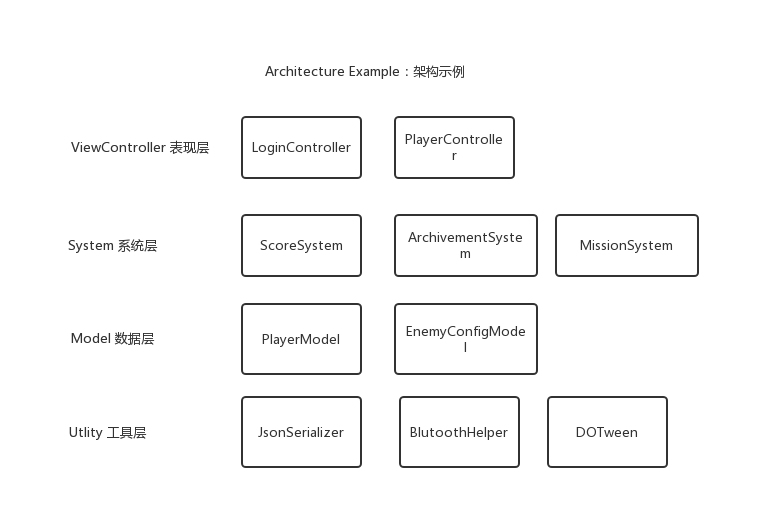
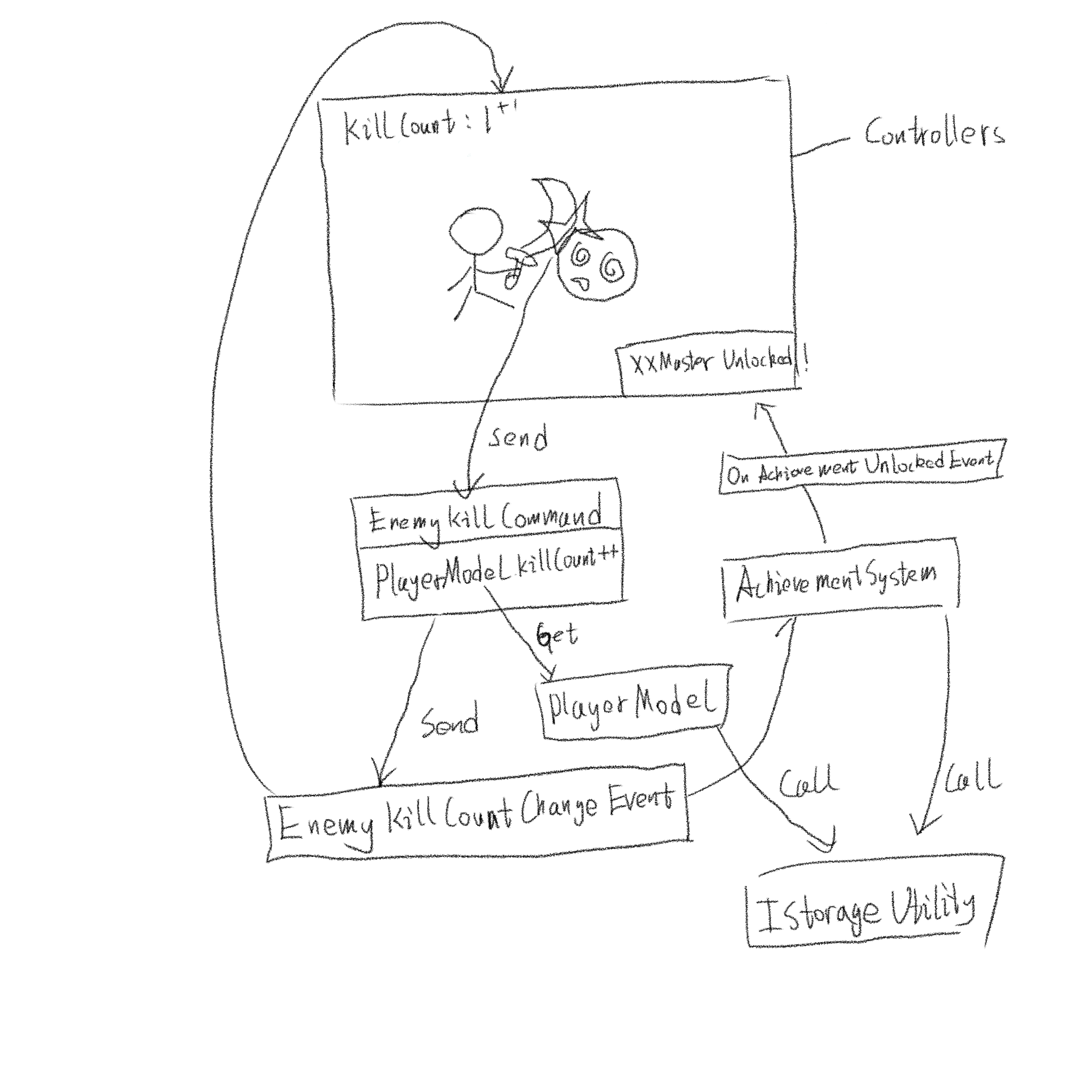
By now, everyone should be able to understand these two pictures.
QFramework is divided into four levels, namely:
Presentation layer: IController
System layer: ISystem
Data layer: IModel
Utility layer: IUtility
In addition to the four levels, we also touched on Command, which reduces the interaction logic of the Controller, and Event, which reduces the presentation logic.
There is also a very important CQRS principle’s simplified version, Command->Model->State Changed Event.
So far, we have gone through the basic usage of QFramework.
Starting from the next article, we will introduce the remaining functions provided by the QFramework architecture, which are optional.
That’s it for this article.