13. Benefits of Architecture
Whether it’s System, Model, or Utility, they are all registered in the Architecture.
Pseudo code is as follows:
namespace QFramework.PointGame
{
    public class PointGame : Architecture<PointGame>
    {
        protected override void Init()
        {
            RegisterSystem<IScoreSystem>(new ScoreSystem());
            RegisterSystem<ICountDownSystem>(new CountDownSystem());
            RegisterSystem<IAchievementSystem>(new AchievementSystem());

            RegisterModel<IGameModel>(new GameModel());

            RegisterUtility<IStorage>(new PlayerPrefsStorage());
        }
    }
}
You may ask, if a project has a lot of Systems, Models, and Utilities registered in the Architecture, wouldn’t the code of the Architecture become more complex and difficult to manage?
The answer is no. The more modules registered in the Architecture, the greater the role this architecture can play.
Because the Architecture itself can display the structure of the project very well, it can be regarded as an architectural diagram.
For example, the architecture diagram corresponding to the above pseudo code is as follows:
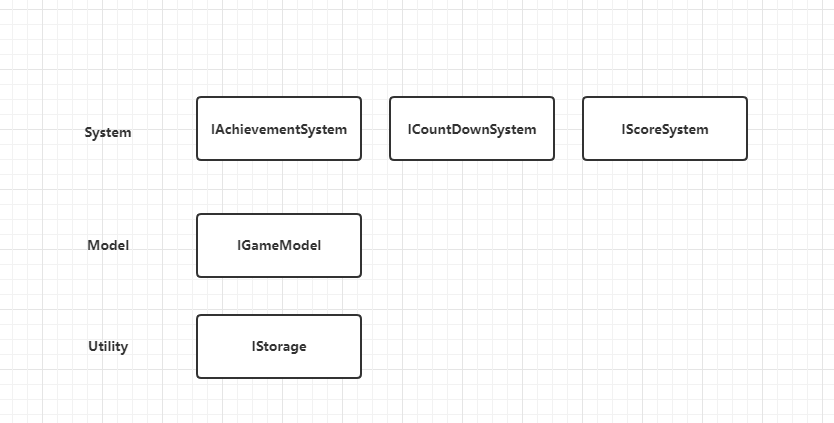
Very clear.
In the pseudo code, there are only 5 registered modules, which is very rare. In general, projects will register dozens or even hundreds of modules.
If all these modules are implemented using singletons without using QFramework, the project will become very messy.
With QFramework, we can centrally manage these modules in the Architecture, which is convenient for project management.
This is the advantage of using Architecture.
Here, let me share the Architecture of a project I once wrote, the code is as follows:
using IndieGame.Models;
using IndieGame.Utility;
using QFramework;
using UnityEngine;
using UTGM;

namespace IndieGame
{
    public class LiangxiesGame : Architecture<LiangxiesGame>
    {
        public static bool IsTestMode = true;

        public static void SetTestMode(bool testMode)
        {
            IsTestMode = testMode;
        }

        protected override void Init()
        {
            RegisterSystem<ISaveSystem>(new SaveSystem());
            RegisterSystem<IInputSystem>(new InputSystem());
            RegisterSystem<ILevelSystem>(new LevelSystem());
            RegisterSystem<IBookSystem>(new BookSystem());
            RegisterSystem<IMapSystem>(new MapSystem());
            RegisterSystem<IGameTimeSystem>(new GameTimeSystem());
            RegisterSystem<IRankSystem>(new RankSystem());
            RegisterSystem<IGameSystem>(new GameSystem());
            RegisterSystem<ILuaSystem>(new LuaSystem());
            RegisterSystem<IAchievementSystem>(new AchievementSystem());
            RegisterSystem<IEnemyRecycleSystem>(new EnemyRecycleSystem());
            RegisterSystem<IUISystem>(new UISystem());
            RegisterSystem<IHurtSystem>(new HurtSystem());
            RegisterSystem<ILevelUpSystem>(new LevelUpSystem());
            RegisterSystem<ILevelConfigSystem>(new LevelConfigSystem());

            RegisterModel<ICoinModel>(new CoinModel());
            RegisterModel<ISettingModel>(new SettingModel());
            RegisterModel<IBookModel>(new BookModel());
            RegisterModel<IMechanismModel>(new MechanismModel());
            RegisterModel<IPlayerModel>(new PlayerModel());

            RegisterUtility<IStorage>(new EasySaveStorage());

            Application.persistentDataPath.CreateDirIfNotExists();
        }
    }
}
It is clear at a glance what is in the System layer, what is in the Model layer, and what is in the Utility layer.
That’s it for this article.