04. ActionKit Sequential Action Execution System
ActionKit is a sequential action execution system.
In games, tasks such as playing animations, delays, asynchronous loading of resources, executing Tweens, network requests, etc. are all sequential tasks. ActionKit can integrate all these tasks together and use a unified API to plan their execution.
Now, let’s take a look at the basic usage of ActionKit.
Delayed Callback
The sample code is as follows:
using UnityEngine;

namespace QFramework.Example
{
    public class DelayExample : MonoBehaviour
    {
        void Start()
        {
            Debug.Log("Start Time:" + Time.time);

            ActionKit.Delay(1.0f, () =>
            {
                Debug.Log("End Time:" + Time.time);

            }).Start(this);
        }
    }
}

// 输出结果// Start Time: 0// End Time: 1.00781
Sequence and Completion Callback
using UnityEngine;

namespace QFramework.Example
{
    public class SequenceAndCallback : MonoBehaviour
    {
        void Start()
        {
            Debug.Log("Sequence Start:" + Time.time);

            ActionKit.Sequence()
                .Callback(() => Debug.Log("Delay Start:" + Time.time))
                .Delay(1.0f)
                .Callback(() => Debug.Log("Delay Finish:" + Time.time))
                .Start(this, _ => { Debug.Log("Sequence Finish:" + Time.time); });
        }
    }
}
// 输出结果
// Sequence Start:0
// Delay Start:0
// Delay Finish:1.00537
// Sequence Finish:1.00537
Frame Delay
using UnityEngine;

namespace QFramework.Example
{
    public class DelayFrameExample : MonoBehaviour
    {
        void Start()
        {
            Debug.Log("Delay Frame Start FrameCount:" + Time.frameCount);

            ActionKit.DelayFrame(1, () => { Debug.Log("Delay Frame Finish FrameCount:" + Time.frameCount); })
                .Start(this);


            ActionKit.Sequence()
                .DelayFrame(10)
                .Callback(() => Debug.Log("Sequence Delay FrameCount:" + Time.frameCount))
                .Start(this);

            // ActionKit.Sequence()
            //      .NextFrame()
            //      .Start(this);

            ActionKit.NextFrame(() => { }).Start(this);
        }
    }
}

// 输出结果
// Delay Frame Start FrameCount:1
// Delay Frame Finish FrameCount:2
// Sequence Delay FrameCount:11
Conditional Execution
using UnityEngine;

namespace QFramework.Example
{
    public class ConditionExample : MonoBehaviour
    {
        private void Start()
        {
            ActionKit.Sequence()
                .Callback(() => Debug.Log("Before Condition"))
                .Condition(() => Input.GetMouseButtonDown(0))
                .Callback(() => Debug.Log("Mouse Clicked"))
                .Start(this);
        }
    }
}

// 输出结果
// Before Condition
// 鼠标左键按下后
// Mouse Clicked
Repeated Execution
using UnityEngine;

namespace QFramework.Example
{
    public class RepeatExample : MonoBehaviour
    {
        private void Start()
        {
            ActionKit.Repeat()
                .Condition(() => Input.GetMouseButtonDown(0))
                .Callback(() => Debug.Log("Mouse Clicked"))
                .Start(this);


            ActionKit.Repeat(5)
                .Condition(() => Input.GetMouseButtonDown(1))
                .Callback(() => Debug.Log("Mouse right clicked"))
                .Start(this, () =>
                {
                    Debug.Log("Right click finished");
                });
        }
    }
}

// 输出结果
// 每次点击鼠标左键都会输出:Mouse Clicked
// 点击鼠标右键,只会输出五次:Mouse right clicked,第五次输出  Right click finished
//
Parallel Execution
using UnityEngine;

namespace QFramework.Example
{
    public class ParallelExample : MonoBehaviour
    {
        void Start()
        {
            Debug.Log("Parallel Start:" + Time.time);

            ActionKit.Parallel()
                .Delay(1.0f, () => { Debug.Log(Time.time); })
                .Delay(2.0f, () => { Debug.Log(Time.time); })
                .Delay(3.0f, () => { Debug.Log(Time.time); })
                .Start(this, () =>
                {
                    Debug.Log("Parallel Finish:" + Time.time);
                });
        }
    }
}

// 输出结果
// Parallel Start:0
// 1.030884
// 2.025135
// 3.018883
// Parallel Finish:3.018883
More Complex Examples
using UnityEngine;

namespace QFramework.Example
{
    public class ComplexExample : MonoBehaviour
    {
        private void Start()
        {
            ActionKit.Sequence()
                .Callback(() => Debug.Log("Sequence Start"))
                .Callback(() => Debug.Log("Parallel Start"))
                .Parallel(p =>
                {
                    p.Delay(1.0f, () => Debug.Log("Delay 1s Finished"))
                        .Delay(2.0f, () => Debug.Log("Delay 2s Finished"));
                })
                .Callback(() => Debug.Log("Parallel Finished"))
                .Callback(() => Debug.Log("Check Mouse Clicked"))
                .Sequence(s =>
                {
                    s.Condition(() => Input.GetMouseButton(0))
                        .Callback(() => Debug.Log("Mouse Clicked"));
                })
                .Start(this, () =>
                {
                    Debug.Log("Finish");

                });
        }
    }
}

// Sequence Start
// Parallel Start
// Delay 1s Finished
// Delay 2s Finished
// Parallel Finished
// Check Mouse Clicked
// 此时按下鼠标左键
// Mouse Clicked
// Finish
Custom Actions
using UnityEngine;

namespace QFramework.Example
{
    public class CustomExample : MonoBehaviour
    {
        class SomeData
        {
            public int ExecuteCount = 0;
        }

        private void Start()
        {
            ActionKit.Custom(a =>
            {
                a
                    .OnStart(() => { Debug.Log("OnStart"); })
                    .OnExecute(dt =>
                    {
                        Debug.Log("OnExecute");

                        a.Finish();
                    })
                    .OnFinish(() => { Debug.Log("OnFinish"); });
            }).Start(this);

            // OnStart
            // OnExecute
            // OnFinish

            ActionKit.Custom<SomeData>(a =>
                {
                    a
                        .OnStart(() =>
                        {
                            a.Data = new SomeData()
                            {
                                ExecuteCount = 0
                            };
                        })
                        .OnExecute(dt =>
                        {
                            Debug.Log(a.Data.ExecuteCount);
                            a.Data.ExecuteCount++;

                            if (a.Data.ExecuteCount >= 5)
                            {
                                a.Finish();
                            }
                        }).OnFinish(() => { Debug.Log("Finished"); });
                })
                .Start(this);

            // 0
            // 1
            // 2
            // 3
            // 4
            // Finished
            // 还支持 Sequence、Repeat、Spawn 等
            // Also support sequence repeat spawn// ActionKit.Sequence()
            //     .Custom(c =>
            //     {
            //         c.OnStart(() => c.Finish());
            //     }).Start(this);
        }
    }
}
Coroutine Support
using System.Collections;
using UnityEngine;

namespace QFramework.Example
{
    public class CoroutineExample : MonoBehaviour
    {
        private void Start()
        {
            ActionKit.Coroutine(SomeCoroutine).Start(this);

            SomeCoroutine().ToAction().Start(this);

            ActionKit.Sequence()
                .Coroutine(SomeCoroutine)
                .Start(this);
        }

        IEnumerator SomeCoroutine()
        {
            yield return new WaitForSeconds(1.0f);
            Debug.Log("Hello:" + Time.time);
        }
    }
}

// 输出结果
// Hello:1.002077
// Hello:1.002077
// Hello:1.002077
Global Mono Lifecycle
using UnityEngine;

namespace QFramework.Example
{
    public class GlobalMonoEventsExample : MonoBehaviour
    {
        void Start()
        {
            ActionKit.OnUpdate.Register(() =>
            {
                if (Time.frameCount % 30 == 0)
                {
                    Debug.Log("Update");
                }
            }).UnRegisterWhenGameObjectDestroyed(gameObject);

            ActionKit.OnFixedUpdate.Register(() =>
            {
                // fixed update code here
                // 这里写 fixed update 相关代码
            }).UnRegisterWhenGameObjectDestroyed(gameObject);

            ActionKit.OnLateUpdate.Register(() =>
            {
                // late update code here
                // 这里写 late update 相关代码
            }).UnRegisterWhenGameObjectDestroyed(gameObject);

            ActionKit.OnGUI.Register(() =>
            {
                GUILayout.Label("See Example Code");
                GUILayout.Label("请查看示例代码");
            }).UnRegisterWhenGameObjectDestroyed(gameObject);

            ActionKit.OnApplicationFocus.Register(focus =>
            {
                Debug.Log("focus:" + focus);
            }).UnRegisterWhenGameObjectDestroyed(gameObject);

            ActionKit.OnApplicationPause.Register(pause =>
            {
                Debug.Log("pause:" + pause);
            }).UnRegisterWhenGameObjectDestroyed(gameObject);

            ActionKit.OnApplicationQuit.Register(() =>
            {
                Debug.Log("quit");
            }).UnRegisterWhenGameObjectDestroyed(gameObject);
        }
    }
}
DOTween Integration
You need to install DOTween first.
Then import the following package from the Example.
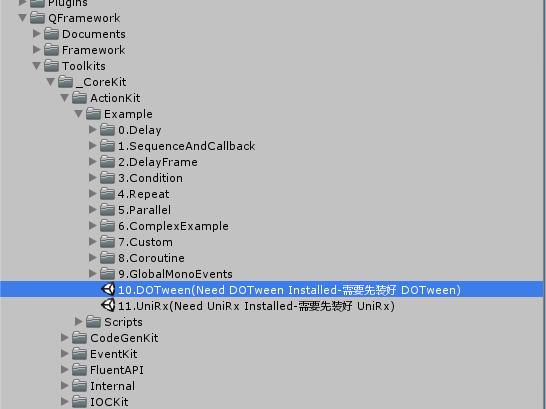
After importing, you can use ActionKit to run DOTween. The code is as follows:
using DG.Tweening;
using UnityEngine;

namespace QFramework.Example
{
    public class DOTweenExample : MonoBehaviour
    {
        private void Start()
        {
            // 使用 Custom 就可以方便接入
            // Just Use Custom
            ActionKit.Custom(c =>
            {
                c.OnStart(() => { transform.DOLocalMove(Vector3.one, 0.5f).OnComplete(c.Finish); });
            }).Start(this);

            // 也可以自定义 IAction
            // Also implement with IAction
            DOTweenAction.Allocate(() => transform.DOLocalRotate(Vector3.one, 0.5f))
                .Start(this);

            // 使用 ToAction
            // Use ToAction
             DOVirtual.DelayedCall(2.0f, () => LogKit.I("2.0f")).ToAction().Start(this);

            // 链式 API 支持
            // fluent api support
            ActionKit.Sequence()
                .DOTween(() => transform.DOScale(Vector3.one, 0.5f))
                .Start(this);
        }
    }


}
UniRx Integration
You need to install UniRx first.
Then import the following package from the Example.

After importing successfully, use the example as follows:
using System;
using UniRx;
using UnityEngine;

namespace QFramework.Example
{
    public class UniRxExample : MonoBehaviour
    {
        void Start()
        {
            // 可以直接使用 Custom
            // directly use custom
            ActionKit.Custom(c =>
            {
                c.OnStart(() => { Observable.Timer(TimeSpan.FromSeconds(1.0f)).Subscribe(_ => c.Finish()); });
            }).Start(this, () => LogKit.I("1.0f"));

            // 使用 UniRxAction 不方便...
            // Use UniRxAction
            UniRxAction<long>.Allocate(() => Observable.Timer(TimeSpan.FromSeconds(2.0f))).Start(this,()=>LogKit.I("2.0f"));


            // 使用 ToAction 方便易用
            // Use ToAction
            Observable.Timer(TimeSpan.FromSeconds(3.0f)).ToAction().Start(this, () => LogKit.I("3.0f"));

            ActionKit.Sequence()
                .UniRx(() => Observable.Timer(TimeSpan.FromSeconds(4.0f)))
                .Start(this, () => LogKit.I("4.0f"));
        }
    }

}
That’s all about the introduction to ActionKit.